Netflix on my setup is quiet. YouTube is not. I’d finish an episode at a comfortable volume, open YouTube, and get blasted by some video’s intro before I could find the remote. So I wanted my Denon receiver to remember a volume for each Apple TV app, and if I nudge it with the remote, remember that instead. Small ask. It ended up involving a tiny computer, Bluetooth, Home Assistant and a lot of figuring out what an Apple TV is actually doing. All so I could press the volume buttons a little less.
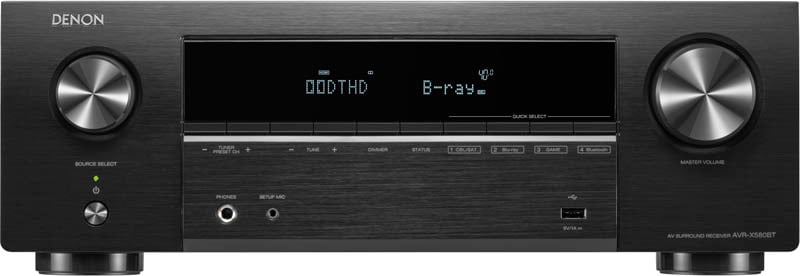
The receiver is a Denon AVR-X580BT, and I wanted to keep it. An ESP32 board talks to it over Bluetooth and sits on my Wi-Fi, where Home Assistant tells it which Apple TV app is playing. That’s Denon App Volume. The board sits near the receiver on USB power, with no soldering or modifications inside the Denon.
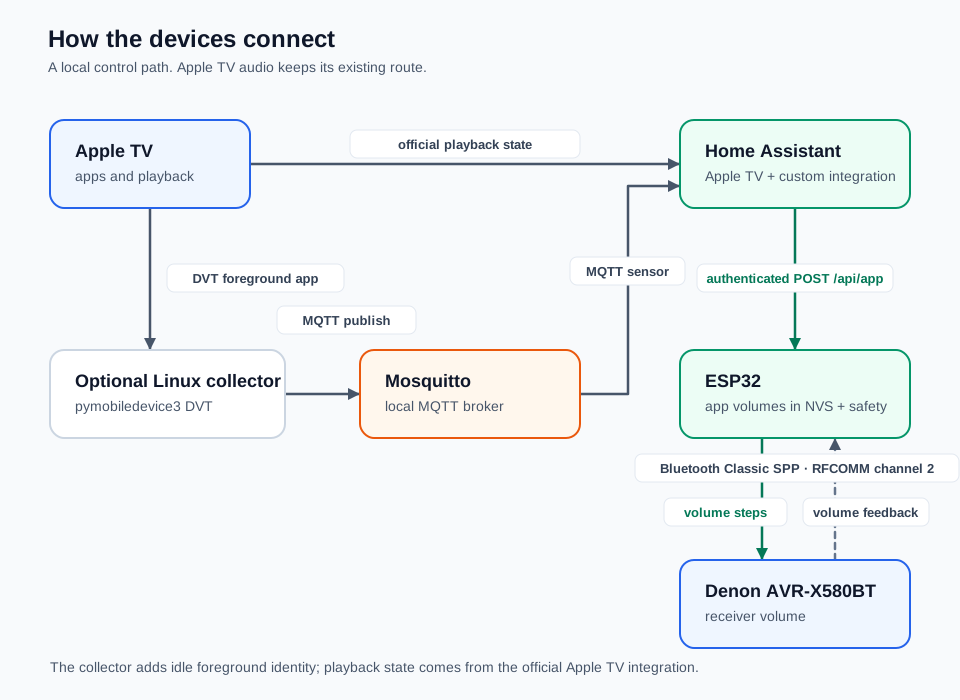
The full setup. The collector and MQTT add app detection before playback starts. These connections carry control information; the audio keeps its usual route.
When the system first sees an app, it learns the current receiver volume, as long as the receiver isn’t muted. If I adjust it with the remote, that becomes the app’s new setting, and coming back to the app restores it. The ESP32 keeps up to 16 apps in flash, with a backup in Home Assistant, and has a little web page showing what it thinks is going on. Very useful when the receiver and I disagree.
The board uses Bluetooth Classic’s Serial Port Profile, or SPP, on RFCOMM channel 2, with commands captured from the AVR-X580BT’s remote-control service. Other receivers may not understand them, so this isn’t a promise for every Denon with Bluetooth. Pairing uses the A2DP audio profile once to set up the bond. After that the board reconnects over SPP without taking over Bluetooth audio.
Which app gets the volume?
My first instinct was to give the volume to whatever app was on screen. Then I pictured Spotify playing while I browse Netflix, and the music jumping up because I opened something else. So the app playing audio takes priority. Home Assistant’s Apple TV integration uses pyatv, and my integration reads the media player’s state and app identity from it. That covers switching on playback, but it can’t reliably tell which app is open while I’m still browsing.
For that, a collector runs on an always-on Linux box. It uses pymobiledevice3 to open a paired connection to the Apple TV’s DVT developer services, asks the DeviceInfo API for the process list, and looks for the app with the foregroundRunning flag. It publishes that through a local Mosquitto broker, with MQTT discovery so it shows up in Home Assistant as a sensor. Availability is published separately, because a remembered app isn’t proof it’s still on screen. If the reading fails or looks ambiguous, the sensor goes unavailable instead of guessing.
Leaning on developer services makes this the most fragile part. An Apple TV update already broke it once. Updating the software that talks to it fixed that without touching the receiver firmware or losing saved volumes. It’s all local, so no cloud account or subscription, but I can’t forget the software exists either.
Getting to the saved volume
From Home Assistant to the ESP32 it’s basically a small web app. My custom integration sends JSON to the board’s POST /api/app endpoint over local HTTP, with a bearer token created during pairing. The message has the app identity and whether it’s playing. A fresh idle-app change also carries an event ID, so a retried delivery can’t trigger a second restore. Home Assistant picks the app. The ESP32 owns the saved volume and the adjusting, because it’s the one that can hear back from the receiver.
It steps there with volume-up and volume-down commands, reading the receiver’s replies as it goes, and stops at the saved value or with an error if the feedback stalls or the adjustment goes past its limits. It ignores the in-between values so it doesn’t overwrite the very preference it’s restoring. After that, the physical remote is back in charge of teaching it.
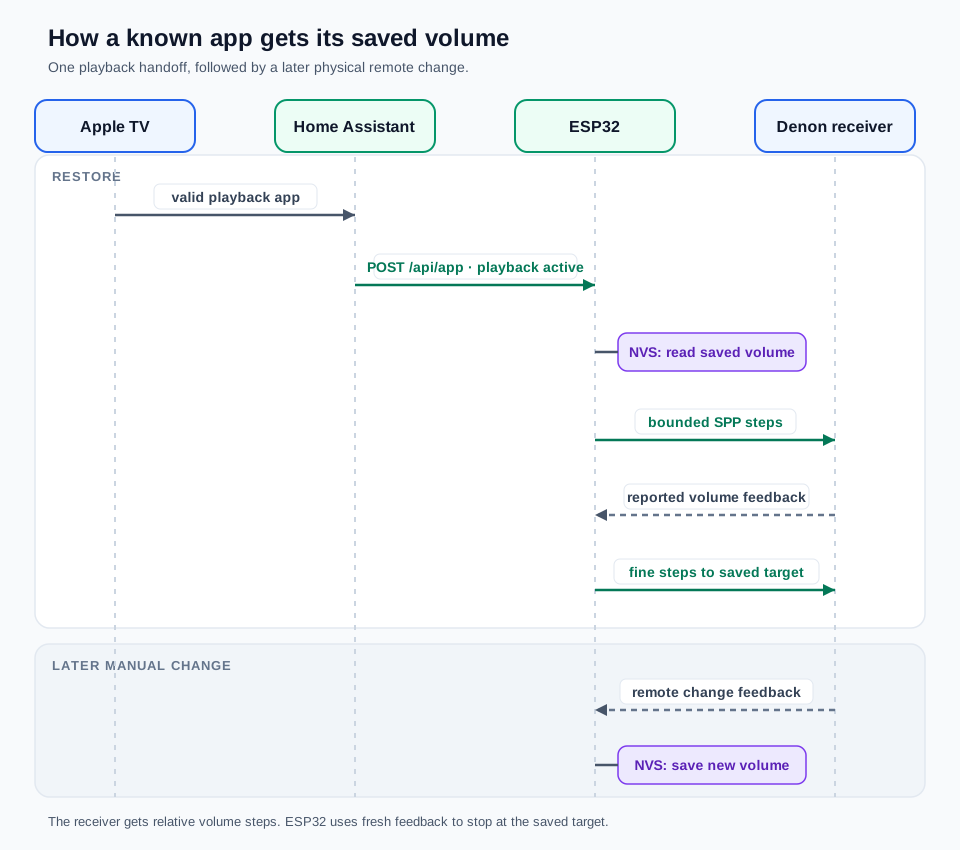
A known app during unmuted playback. The receiver’s replies determine when the adjustment finishes.
Mute made it messier. The Denon’s volume commands can unmute it, so an idle-app adjustment may briefly unmute and then mute again. If the connection drops in between, the receiver can stay unmuted until it reconnects. Some of those interruption cases still need physical testing, and they’re written down in the acceptance notes instead of being quietly ignored.
It doesn’t fix everything, either. A quiet film and a loud one inside Netflix still need different volumes. This remembers a preference per app. It doesn’t listen to the audio and even things out.
Trying it yourself
Start with playback-based switching and leave foreground detection for later. You need an Apple TV in Home Assistant, a compatible receiver, and an original ESP32 development board with USB power and 2.4 GHz Wi-Fi. The ESP32-S3 and ESP32-C3 don’t have the Bluetooth Classic this needs, and Espressif’s compatibility table explains why. I’ve only tested the AVR-X580BT, so don’t assume another Denon works just because the logo matches.
The setup instructions on GitHub have the commands and configuration. Use the firmware and integration from that linked revision, since newer recovery changes still need physical testing. Get the official Apple TV integration working first, then flash the ESP32 and give it your Wi-Fi details through its setup network. Its web page then walks you through pairing the receiver, confirming the number with the Denon remote. Turn off Bluetooth Auto-Select so the receiver doesn’t jump to Bluetooth audio. Denon’s manual covers that setting. Back up Home Assistant, install the custom integration and pick your Apple TV media player as the app source.
To test it, start quietly and play something in Netflix. Once the controller page shows Netflix, change the volume with the remote and check the saved value updates. Do the same in YouTube at a different volume, then switch back and forth. Each app should get its own volume back. Keep the controller’s web page on your home network, away from the internet.
The foreground collector is in the repository too, if you later want the volume to change while you’re still browsing. It needs an always-on Linux host and follows my DietPi setup, not a one-click add-on. I’d only bother once the simple version works and you’re sure it’s worth maintaining another piece of software.
Once it’s running, almost nothing changes. Same remote, same apps. If the volume needs a nudge, I nudge it, and next time the receiver remembers. Way more work than I expected for a few fewer button presses, but I kept my equipment and made it do what I wanted. Good enough reason for a hobby project.
じゃあまたね